Fast POS billing
Touch-friendly POS screen with product search, barcode scan, quick keys, hold and recall bills.

Make GST bills in seconds, keep stock right across shops and godowns, and see your sales, profit and dues from anywhere. Namma Billing is simple cloud billing software for retail shops, supermarkets, wholesalers, restaurants, pharmacies, mobile and repair shops – made in Bengaluru, used across Karnataka and Tamil Nadu.
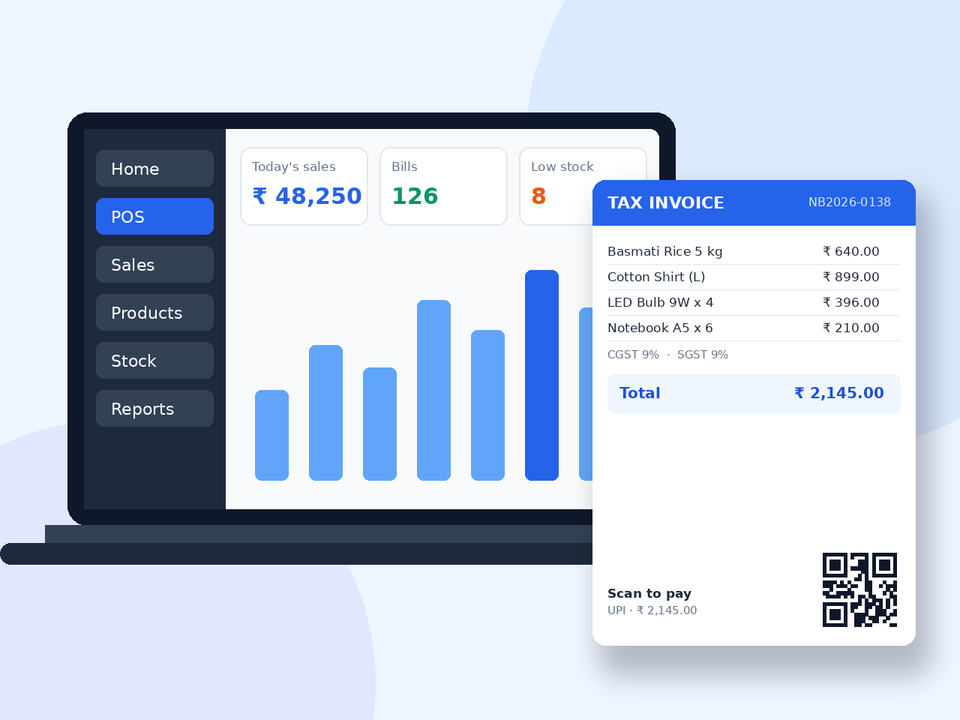
Billing, inventory, GST, accounts and business tools – in one simple cloud software.
Touch-friendly POS screen with product search, barcode scan, quick keys, hold and recall bills.
A4 / A5 tax invoices with GSTIN, HSN, CGST / SGST / IGST, place of supply and amount in words.
Pick from ready designs – Pro Modern, GST, Minimal, Bold, Thermal – and set your colour, font and logo.
Print on 58 mm and 80 mm thermal printers straight from the browser.
Customers scan the QR on the bill and GPay / PhonePe / Paytm opens with the amount filled.
Send quotations, turn them into orders and bills, and track what is still to be delivered.
Send the invoice link to your customer's WhatsApp right after billing.
Live stock for every product and location, low-stock alerts and stock value.
Print barcode labels with name, price and MRP on label or thermal printers.
Sizes, colours, units like box / piece, lot numbers and expiry dates.
Track every serial or IMEI number from purchase to sale and warranty.
Many shops and godowns in one account; move stock between them with a transfer note.
Everything a growing Indian business needs to bill, stock and grow – without software to install or servers to look after.
Cloud software – open it on the shop PC, a laptop at home or your phone and see live sales.
GSTIN, HSN / SAC, CGST + SGST or IGST worked out for every line, amount in words and tax summary.
Scan, bill and print a thermal receipt in seconds. Print your own barcode labels.
Stock updates with every bill and purchase – branches, godowns, expiry dates, lots and serial numbers.
Roles and permissions – cashiers bill, managers buy, only the owner sees profit.
Profit & loss, GST reports, stock value, item-wise sales, customer dues and more.
UPI scan-to-pay QR on the bill with the amount filled in, plus payment reminders for dues.
Help from our Bengaluru team on phone and WhatsApp – setup, invoice design and printers.
One software, set up the way your trade works.
Barcode billing, loose items by weight, offers, fast counters and daily stock reports.
Size and colour variants, barcode labels, wholesale and retail prices for the same item.
Table-wise orders, kitchen orders, quick counter billing and thermal receipts.
Batch / lot numbers, expiry alerts, sell in strips or units, supplier purchase entry.
IMEI / serial number tracking, warranty on the bill, repair job sheets.
Job sheets, technician assignment, repair status link for customers, invoice on delivery.
Price groups for dealers, credit limits, purchase orders, sales orders and customer dues.
Recipes / bill of materials, production entry and finished-goods stock.
We help you start right – from importing products to designing your bill and setting up printers.
We set up Namma Billing for your shop – business details, GST, tax rates, locations, invoice numbering and users – so you can start billing on day one.
Move your products, opening stock, customers and suppliers from Excel or your old software into Namma Billing without typing them again.
Short, practical training for your owner, manager and cashiers – billing, returns, purchases, stock and reports.
Your bill is your brand. We set up a GST invoice or thermal receipt design with your logo, colours, bank details, UPI QR and terms.
Help to connect thermal receipt printers, A4 printers, barcode label printers and barcode scanners with Namma Billing.
Opening more than one shop or a godown? We set up locations, stock transfer, branch bill numbers and staff access – you see every branch.
Choosing billing software for your shop? Use this 12-point checklist – GST invoices, POS speed, stock, reports, staff control, support and p...
Read moreWhat must a GST tax invoice show? Invoice number, GSTIN, HSN, taxable value, CGST / SGST / IGST, place of supply and more – explained simply...
Read moreWhen do you charge CGST + SGST and when IGST? A simple guide for shop owners with examples, place of supply and how billing software decides...
Read moreTalk to our team or start a free trial – setup takes a few minutes.
Namma Billing is online (cloud) software for GST billing, POS, stock and accounts. You open it in a browser – there is nothing to install – and use it from your shop counter, office or phone.
Yes. You can create your shop account and try Namma Billing free before you pay. No card is needed to start the trial. See the Pricing page for the current trial days of each plan.
Yes. Add your GSTIN, set tax rates and HSN / SAC codes on products, and every bill shows the taxable value, CGST + SGST for sales inside your state or IGST for other states, plus an HSN-wise tax summary on the Pro GST invoice design.
Yes. Any USB or Bluetooth barcode scanner that types like a keyboard works on the POS screen. Bills print on normal A4 / A5 printers or on 58 mm and 80 mm thermal receipt printers, and you can print barcode labels for your products.
Yes. Add business locations for each branch or warehouse, see stock of every location, move stock with stock transfers and give each staff member access only to their own location.
Only if you allow it. Roles and permissions decide what each user can see and do – for example a cashier can only make bills, while the owner sees purchase prices, profit and all reports.
Yes. Namma Billing works in the browser of Android phones, iPhones and tablets, and can be installed on the home screen like an app. An internet connection is needed while you use it.
Yes. Products, customers and suppliers can be imported from Excel / CSV files. Our team can help you with the import when you start.
Call or WhatsApp us on +91 9019912392, or write to info@nammabilling.com. We help with setup, invoice design, printers and day-to-day questions.
Pick a plan on the Pricing page and pay online or ask us for offline payment. Your bills, stock and reports stay in your account when you renew or upgrade.
Guides for shops and businesses in Bengaluru and Tamil Nadu – setup and support by phone and WhatsApp.